> ## Documentation Index
> Fetch the complete documentation index at: https://wb-21fd5541-automation-updates-docs-2928-docs-2829.mintlify.site/llms.txt
> Use this file to discover all available pages before exploring further.
> Python SDK を使用して W&B Experiment を作成し、run の初期化、ハイパーパラメーター、メトリクスをログすることをトラッキングします。
# Experiment を作成する
W\&B Python SDK を使用して、機械学習の実験をトラッキングできます。結果はインタラクティブなダッシュボードで確認できるほか、[W\&B Public API](/ja/models/ref/python/public-api/) を使用してプログラムからアクセスできるよう、データを Python にエクスポートすることもできます。
このガイドでは、W\&B の構成要素を使用して W\&B Experiment を作成する方法を説明します。
## W\&B Experiment の作成方法
4 つの step で W\&B Experiment を作成します。
1. [W\&B run を初期化する](#initialize-a-wb-run)
2. [ハイパーパラメーターの 辞書 を記録する](#capture-a-dictionary-of-hyperparameters)
3. [トレーニングループ内でメトリクスをログする](#log-metrics-inside-your-training-loop)
4. [Artifact を W\&B にログする](/ja/models/track/create-an-experiment#log-an-artifact-to-w%26b)
### W\&B run を初期化する
W\&B Run を作成するには、[`wandb.init()`](/ja/models/ref/python/functions/init) を使用します。
次のスニペットは、`“cat-classification”` という名前の W\&B プロジェクトに run を作成し、この run を識別しやすくするために説明として `“My first experiment”` を設定しています。さらに、`“baseline”` と `“paper1”` のタグを追加して、この run が将来の論文公開を想定したベースライン実験であることがわかるようにしています。
```python theme={null}
import wandb
with wandb.init(
project="cat-classification",
notes="My first experiment",
tags=["baseline", "paper1"],
) as run:
...
```
`wandb.init()` は [Run](/ja/models/ref/python/experiments/run) オブジェクトを返します。
注: `wandb.init()` を呼び出した時点ですでにそのプロジェクトが存在する場合、Runs は既存のプロジェクトに追加されます。たとえば、`“cat-classification”` という名前のプロジェクトがすでにある場合、そのプロジェクトは削除されず、引き続き存在します。代わりに、そのプロジェクトに新しい run が追加されます。
### ハイパーパラメーターの辞書を記録する
学習率やモデルタイプなどのハイパーパラメーターを辞書として保存します。`config` に記録したモデルの設定は、後で結果を整理したりクエリしたりするのに役立ちます。
```python theme={null}
with wandb.init(
...,
config={"epochs": 100, "learning_rate": 0.001, "batch_size": 128},
) as run:
...
```
Experiment の設定方法について詳しくは、[Experiments の設定](./config)を参照してください。
### トレーニングループ内でメトリクスをログする
各トレーニングstepにおける精度や損失などのメトリクスをログするには、[`run.log()`](/ja/models/ref/python/experiments/run/#method-runlog) を呼び出します。
```python theme={null}
model, dataloader = get_model(), get_data()
for epoch in range(run.config["epochs"]):
for batch in dataloader:
loss, accuracy = model.training_step()
run.log({"accuracy": accuracy, "loss": loss})
```
W\&B でログできるさまざまなデータタイプについて詳しくは、[オブジェクトとメディアをログする](/ja/models/track/log/)を参照してください。
### Artifact を W\&B にログする
必要に応じて、W\&B Artifact をログできます。Artifacts を使うと、データセットやモデルのバージョン管理が容易になります。
```python theme={null}
# ファイルやディレクトリを保存できます。この例では、モデルにONNXファイルを出力するsave() methodがあると仮定します。
model.save("path_to_model.onnx")
run.log_artifact("path_to_model.onnx", name="trained-model", type="model")
```
[Artifacts](/ja/models/artifacts/) の詳細、または [Registry](/ja/models/registry/) でのモデルのバージョン管理については、こちらをご覧ください。
### 以上をまとめると
前述のコードスニペットをすべて含む完全なスクリプトを以下に示します。
```python theme={null}
import wandb
with wandb.init(
project="cat-classification",
notes="",
tags=["baseline", "paper1"],
# runのハイパーパラメーターを記録する。
config={"epochs": 100, "learning_rate": 0.001, "batch_size": 128},
) as run:
# モデルとデータを設定する。
model, dataloader = get_model(), get_data()
# メトリクスをログしながらトレーニングを実行し、モデル性能を可視化する。
for epoch in range(run.config["epochs"]):
for batch in dataloader:
loss, accuracy = model.training_step()
run.log({"accuracy": accuracy, "loss": loss})
# トレーニング済みモデルをArtifactとしてアップロードする。
model.save("path_to_model.onnx")
run.log_artifact("path_to_model.onnx", name="trained-model", type="model")
```
## 次のステップ: 実験を可視化する
project の Workspace を使用して、機械学習モデルの結果を整理し、可視化します。[平行座標プロット](/ja/models/app/features/panels/parallel-coordinates/)、[パラメーター重要度分析](/ja/models/app/features/panels/parameter-importance/)、[その他のチャートタイプ](/ja/models/app/features/panels/) などのインタラクティブなチャートを作成できます。
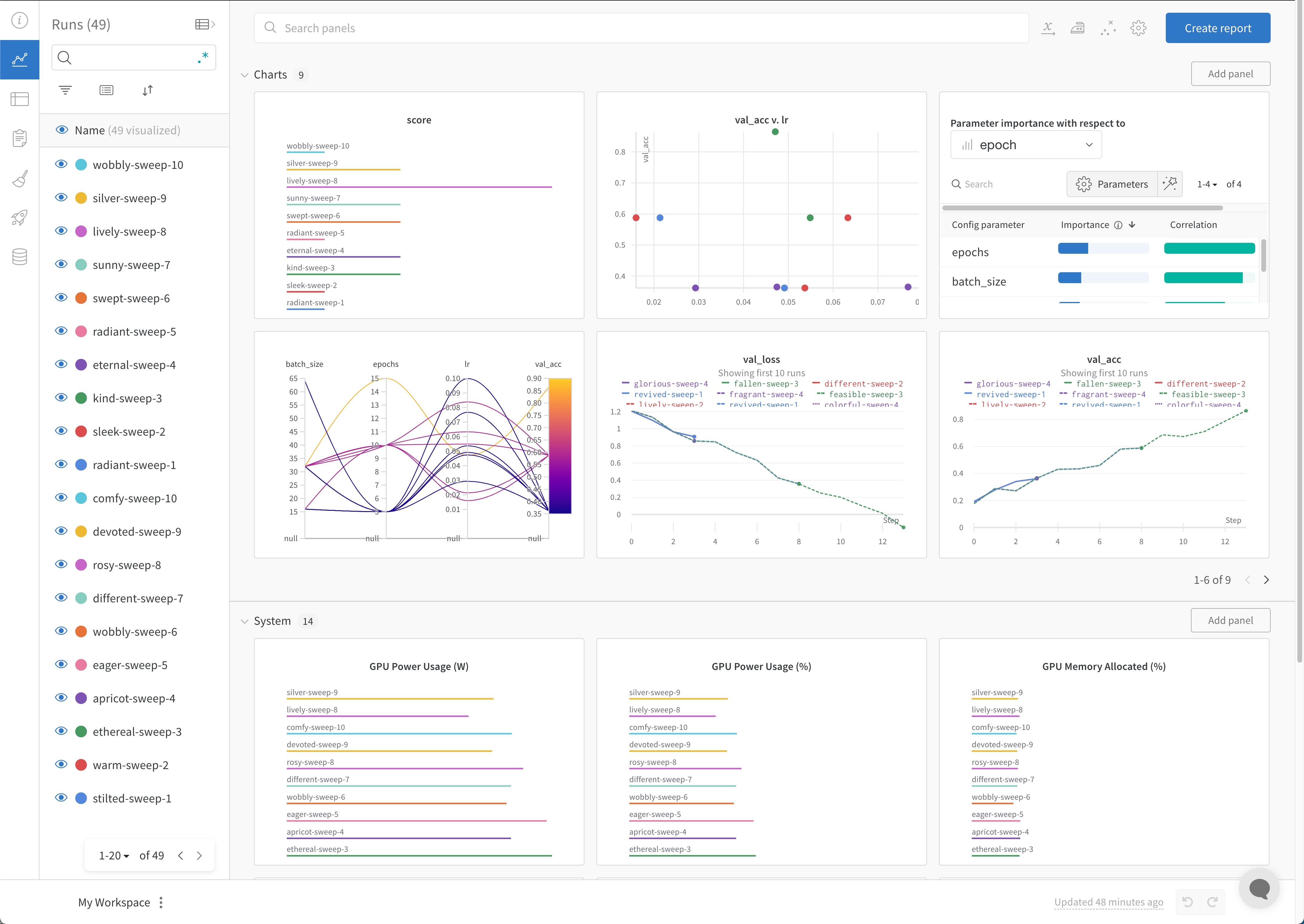 実験や特定の run を表示する方法の詳細については、[実験結果を表示する](/ja/models/track/workspaces/) を参照してください。
## ベストプラクティス
Experiments を作成する際に考慮すべき推奨事項を以下に示します。
* **コンテキストマネージャーで Runs を管理する**: `with` 文で `wandb.init()` を使用すると、コードの実行完了時または例外発生時に run が自動的に終了します。
* Jupyter ノートブックでは、Run オブジェクトを自分で管理したい場合もあります。その場合は、`finish()` を呼び出して完了としてマークします。
```python theme={null}
# ノートブックのセル内:
run = wandb.init()
# 別のセル内:
run.finish()
```
* **Config**: モデルを再現するために必要なハイパーパラメーター、モデル アーキテクチャ、データセット情報、そのほかの値をトラッキングします。詳細は, [W\&B App の run の Overview セクションで設定を表示する](/ja/models/track/config#view-config-values-in-the-w\&b-app)を参照してください。
* **Project**: [Projects](/ja/models/track/project-page) を使用して、結果の可視化、Runs の比較、Artifacts の表示とダウンロード、オートメーションの作成などを行える一元的な場所で Experiments を整理します。
* **メモ**: `baseline model` や `tuned hyperparameters` など、run の目的を説明するメモを追加します。メモは後で W\&B App の run overview から編集できます。
* **ジョブタイプ**: [Runs にジョブタイプを追加](/ja/models/runs/grouping#organize-runs-by-job-type)して、`train`、`test`、`inference` などのタスクごとに Runs を整理してフィルターします。
* **Tags**: [Runs にタグを追加](/ja/models/runs/tags)して、ログされたメトリクスや Artifacts だけでは分かりにくい機能や属性で Runs にラベルを付けます。
次の例は、これらのベストプラクティスを使用して W\&B run を初期化する方法を示しています。
```python theme={null}
import wandb
config = {
"learning_rate": 0.01,
"momentum": 0.2,
"architecture": "CNN",
"dataset_id": "cats-0192",
}
with wandb.init(
project="detect-cats",
notes="tweak baseline",
tags=["baseline", "paper1"],
config=config,
) as run:
...
```
利用可能なパラメーターの詳細については、[Python SDK リファレンスガイド](/ja/models/ref/python/)の [`wandb.init()`](/ja/models/ref/python/functions/init) を参照してください。