> ## Documentation Index
> Fetch the complete documentation index at: https://wb-21fd5541-automation-updates-docs-2928-docs-2829.mintlify.site/llms.txt
> Use this file to discover all available pages before exploring further.
# Log summary metrics
> Track and customize single summary metrics like best accuracy or minimum loss on a W&B run using run.summary.
In addition to values that change over time during training, it is often important to track values that summarizes a model or a preprocessing step. Store this information in a run's `summary` attribute. A run's summary attribute can handle NumPy arrays, PyTorch tensors or TensorFlow tensors. W\&B persists NumPy arrays, PyTorch tensors, and TensorFlow tensors in a binary file.
The last value logged with `wandb.Run.log()` is automatically set as the run's summary dictionary. If a summary metric dictionary is modified, the previous value is lost.
Log a summary metric during an active run or after a run has completed.
The following code snippet demonstrates how to provide a custom summary metric to W\&B:
```python theme={null}
import wandb
import random
# Project that the run is recorded to
project = "summary-demo"
entity = "" # Replace with your W&B entity name
# Dictionary with hyperparameters
config = {
'epochs' : 10,
'lr' : 0.01
}
with wandb.init(entity=entity, project=project, config=config) as run:
offset = random.random() / 5
print(f"lr: {config['lr']}")
# Simulate a training run
for epoch in range(2, config['epochs']):
acc = 1 - 2**-config['epochs'] - random.random() / config['epochs'] - offset
loss = 2**-config['epochs'] + random.random() / config['epochs'] + offset
print(f"epoch={config['epochs']}, accuracy={acc}, loss={loss}")
run.log({"accuracy": acc, "loss": loss})
if epoch % 5 == 0:
run.summary["best_accuracy"] = acc
run.summary["best_loss"] = loss
```
You can update the summary attribute of an existing W\&B Run after training has completed. Use the [W\&B Public API](/models/ref/python/public-api/) to update the summary attribute:
```python theme={null}
api = wandb.Api()
run = api.run("entity/project/run_id")
run.summary["tensor"] = np.random.random(1000)
run.summary.update()
```
The following image shows what the summary metrics might look like if you copy and run the code snippet above:
 ## Customize summary metrics
Custom summary metrics are useful for capturing model performance at the best step of training in your `run.summary`. For example, you might want to capture the maximum accuracy or the minimum loss value, instead of the final value.
By default, the summary uses the final value from history. To customize summary metrics, pass the `summary` argument in `define_metric`. It accepts the following values:
* `"min"`
* `"max"`
* `"mean"`
* `"best"`
* `"last"`
* `"none"`
You can use `"best"` only when you also set the optional `objective` argument to `"minimize"` or `"maximize"`.
The following example adds the min and max values of loss and accuracy to the summary:
```python theme={null}
import wandb
import random
random.seed(1)
with wandb.init() as run:
# Min and max summary values for loss
run.define_metric("loss", summary="min")
run.define_metric("loss", summary="max")
# Min and max summary values for accuracy
run.define_metric("acc", summary="min")
run.define_metric("acc", summary="max")
for i in range(10):
log_dict = {
"loss": random.uniform(0, 1 / (i + 1)),
"acc": random.uniform(1 / (i + 1), 1),
}
run.log(log_dict)
```
## View summary metrics
Access a run’s summary in the W\&B App, during an active run, from an existing run, or from the local file system.
1. Navigate to the W\&B App.
2. Select the **Workspace** tab from the project sidebar.
3. Click the run that logged the summary values. The run page opens with the **Overview** tab shown by default.
4. View the summary values in the **Summary** section.
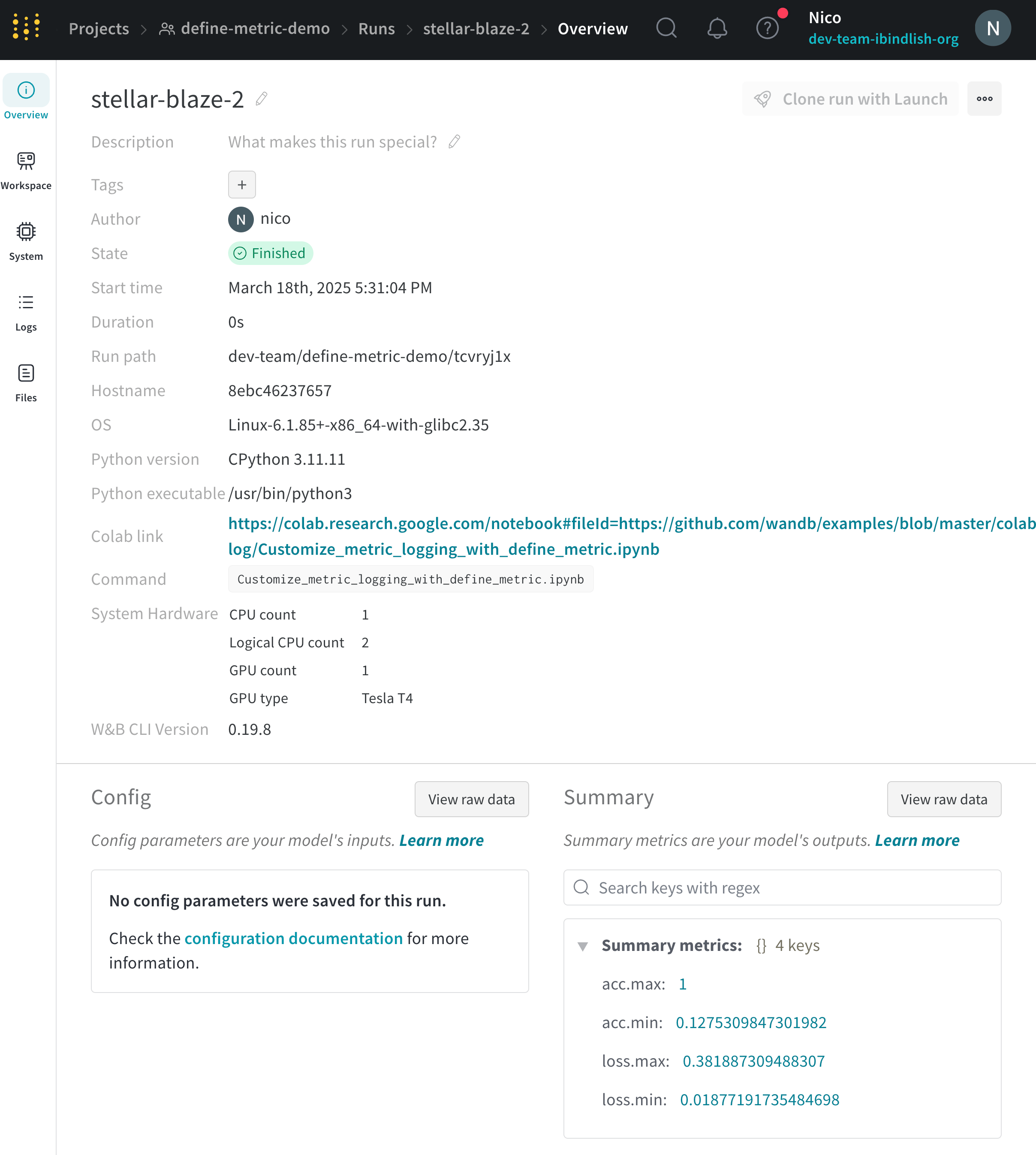
The following image shows what the summary metrics might look like in the **Overview** tab if you copy and run the code snippet above:
## Customize summary metrics
Custom summary metrics are useful for capturing model performance at the best step of training in your `run.summary`. For example, you might want to capture the maximum accuracy or the minimum loss value, instead of the final value.
By default, the summary uses the final value from history. To customize summary metrics, pass the `summary` argument in `define_metric`. It accepts the following values:
* `"min"`
* `"max"`
* `"mean"`
* `"best"`
* `"last"`
* `"none"`
You can use `"best"` only when you also set the optional `objective` argument to `"minimize"` or `"maximize"`.
The following example adds the min and max values of loss and accuracy to the summary:
```python theme={null}
import wandb
import random
random.seed(1)
with wandb.init() as run:
# Min and max summary values for loss
run.define_metric("loss", summary="min")
run.define_metric("loss", summary="max")
# Min and max summary values for accuracy
run.define_metric("acc", summary="min")
run.define_metric("acc", summary="max")
for i in range(10):
log_dict = {
"loss": random.uniform(0, 1 / (i + 1)),
"acc": random.uniform(1 / (i + 1), 1),
}
run.log(log_dict)
```
## View summary metrics
Access a run’s summary in the W\&B App, during an active run, from an existing run, or from the local file system.
1. Navigate to the W\&B App.
2. Select the **Workspace** tab from the project sidebar.
3. Click the run that logged the summary values. The run page opens with the **Overview** tab shown by default.
4. View the summary values in the **Summary** section.
The following image shows what the summary metrics might look like in the **Overview** tab if you copy and run the code snippet above:
 1. Navigate to the W\&B App.
2. Select the **Runs** tab.
3. Within the runs table, you can view the summary values within the columns based on the name of the summary value.
Use `wandb.Run.summary` to access a run’s summary values during an active run. This attribute returns a dictionary of key-value pairs.
The following example accesses a run’s summary. Replace `""` with your W\&B project name:
```python theme={null}
import wandb
with wandb.init(project="", config=config) as run:
run.log({"accuracy": 0.9, "loss": 0.1})
print(run.summary) # prints the summary dictionary
```
Use the W\&B Public API to access summary metrics with the `wandb.Api.Run.summary` property.
The following code example demonstrates one way to retrieve the summary values logged to a specific run using the W\&B Public API and pandas:
```python theme={null}
import wandb
import pandas
entity = ""
project = ""
run_name = "" # Name of run with summary values
all_runs = []
for run in api.runs(f"{entity}/{project_name}"):
print("Fetching details for run: ", run.id, run.name)
run_data = {
"id": run.id,
"name": run.name,
"url": run.url,
"state": run.state,
"tags": run.tags,
"config": run.config,
"created_at": run.created_at,
"system_metrics": run.system_metrics,
"summary": run.summary,
"project": run.project,
"entity": run.entity,
"user": run.user,
"path": run.path,
"notes": run.notes,
"read_only": run.read_only,
"history_keys": run.history_keys,
"metadata": run.metadata,
}
all_runs.append(run_data)
# Convert to DataFrame
df = pd.DataFrame(all_runs)
# Get row based on the column name (run) and convert to dictionary
df[df['name']==run_name].summary.reset_index(drop=True).to_dict()
```
Access summary metrics for multiple runs in a project, iterate over the runs returned by `api.runs()`:
```python theme={null}
import wandb
api = wandb.Api()
runs = api.runs("/")
for run in runs:
print(f"Run name: {run.name}")
print(f"Run ID: {run.id}")
print(f"Run summary: {dict(run.summary)}")
print("----------")
```
The following JSON object shows an example run summary:
```shell theme={null}
Run name: clean-oath-11
Run ID: mt2dasoz
Run summary: {'_runtime': 3, '_step': 1000, '_timestamp': 1778541534.834642, '_wandb.runtime': 3, 'train/epoch_ndx': 1000, 'train/train_loss': 0.25498124957084656}
Run name: zesty-snowball-7
Run ID: qne08r7u
Run summary: {'_runtime': 3, '_step': 1000, '_timestamp': 1776714833.636171, '_wandb.runtime': 3, 'train/epoch_ndx': 1000, 'train/train_loss': 0.24914199113845825}
```
W\&B stores run summary values in the `wandb-summary.json` file in the run directory. To read the summary values locally, open the `wandb-summary.json` file.
By default, W\&B stores run directories at: `./wandb/run--`.
1. Navigate to the W\&B App.
2. Select the **Runs** tab.
3. Within the runs table, you can view the summary values within the columns based on the name of the summary value.
Use `wandb.Run.summary` to access a run’s summary values during an active run. This attribute returns a dictionary of key-value pairs.
The following example accesses a run’s summary. Replace `""` with your W\&B project name:
```python theme={null}
import wandb
with wandb.init(project="", config=config) as run:
run.log({"accuracy": 0.9, "loss": 0.1})
print(run.summary) # prints the summary dictionary
```
Use the W\&B Public API to access summary metrics with the `wandb.Api.Run.summary` property.
The following code example demonstrates one way to retrieve the summary values logged to a specific run using the W\&B Public API and pandas:
```python theme={null}
import wandb
import pandas
entity = ""
project = ""
run_name = "" # Name of run with summary values
all_runs = []
for run in api.runs(f"{entity}/{project_name}"):
print("Fetching details for run: ", run.id, run.name)
run_data = {
"id": run.id,
"name": run.name,
"url": run.url,
"state": run.state,
"tags": run.tags,
"config": run.config,
"created_at": run.created_at,
"system_metrics": run.system_metrics,
"summary": run.summary,
"project": run.project,
"entity": run.entity,
"user": run.user,
"path": run.path,
"notes": run.notes,
"read_only": run.read_only,
"history_keys": run.history_keys,
"metadata": run.metadata,
}
all_runs.append(run_data)
# Convert to DataFrame
df = pd.DataFrame(all_runs)
# Get row based on the column name (run) and convert to dictionary
df[df['name']==run_name].summary.reset_index(drop=True).to_dict()
```
Access summary metrics for multiple runs in a project, iterate over the runs returned by `api.runs()`:
```python theme={null}
import wandb
api = wandb.Api()
runs = api.runs("/")
for run in runs:
print(f"Run name: {run.name}")
print(f"Run ID: {run.id}")
print(f"Run summary: {dict(run.summary)}")
print("----------")
```
The following JSON object shows an example run summary:
```shell theme={null}
Run name: clean-oath-11
Run ID: mt2dasoz
Run summary: {'_runtime': 3, '_step': 1000, '_timestamp': 1778541534.834642, '_wandb.runtime': 3, 'train/epoch_ndx': 1000, 'train/train_loss': 0.25498124957084656}
Run name: zesty-snowball-7
Run ID: qne08r7u
Run summary: {'_runtime': 3, '_step': 1000, '_timestamp': 1776714833.636171, '_wandb.runtime': 3, 'train/epoch_ndx': 1000, 'train/train_loss': 0.24914199113845825}
```
W\&B stores run summary values in the `wandb-summary.json` file in the run directory. To read the summary values locally, open the `wandb-summary.json` file.
By default, W\&B stores run directories at: `./wandb/run--`.